Edit an Opt-In
Pause, resume, or edit budget, dates, and media from the run menu on My Playbooks.
Who Sees What?
Workspace owners with Paid Ads Management use the three-dot menu on My Playbooks. Hub admins can pause many locations at once from Command Center.
Open a run on My Playbooks, then use its three-dot menu to pause, resume, or edit it.
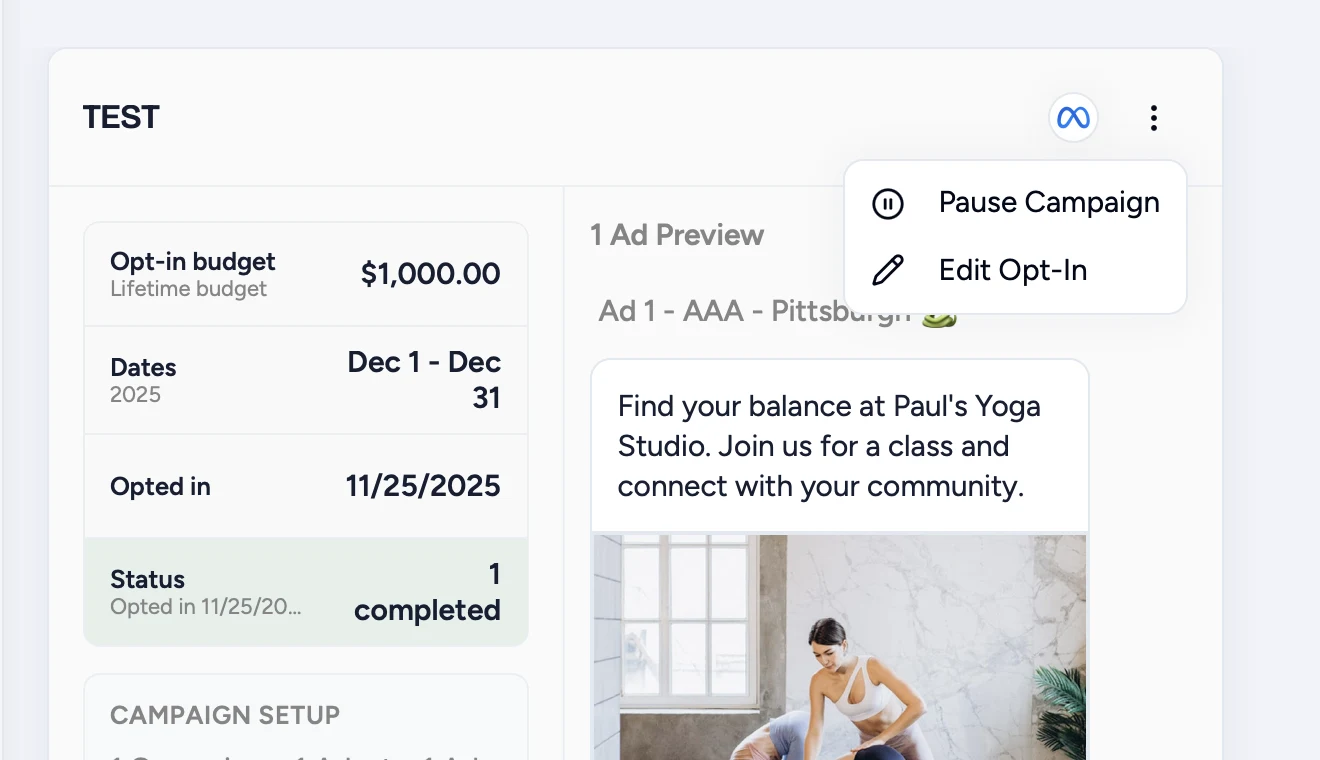
The menu shows one delivery action, then Edit Opt-In.
Pause Campaign
Stops ads. The run and its history stay. Money already spent stays spent. The run reads Paused only after the ad platform confirms.
Resume Campaign
Starts ads again. The resume screen names the amount that will spend going forward and the start date. That amount is additional approved spend.
If a resume is already scheduled, Keep Paused cancels it. Ads stay off. No new spend is approved.
Edit Opt-In
Changes budget, dates, or media on the live run. The amount you enter is the total for that run, not an add-on. A failed save leaves the live campaign running.
If your Hub locked the budget, you can still change dates and media.
Remove is only for a run that never built a campaign and never spent. Ask your Hub to take down a run that already has ads.