Luna & MCP
Luna is your Claude Cowork for franchise marketing: an AI coworker that does real work and proposes a path forward for your approval. Meet the pieces that make her work, Tools, Skills, Routines, Signals, Plays, and Data Connectors, and the specialist team behind her.
For everyone. Luna uses your Brand Kit voice to stay on-brand, and she works in the scope you already have open, your workspace or your hub.
Luna is your Claude Cowork for franchise marketing
Anthropic built Claude Cowork: an AI teammate that takes on real, multi-step work in the background and checks in with you the way a colleague would. Luna is that same idea, on the same Claude models, built specifically for multi-location franchise marketing.
The difference between a coworker and a chatbot is simple. A chatbot answers questions. A coworker does the job. Luna builds the playbook, fills in the new location, finds the gap in your calendar, and drafts the reply, then brings the finished work back to you to approve.
What makes Luna a coworker
You do not need to understand the technology to use Luna. But the picture is simple, and knowing it helps you get more out of her. Think of Luna as a new hire who already knows franchise marketing. A few pieces make her useful:
The individual actions Luna can take inside Flamel: build an ad playbook, check ad-account health, draft a review reply, pull performance for a recap. Each tool is one thing she can do.
Skills are recipes for multi-step work. Luna comes with proven Skills preloaded, like "Onboard a new location," and you can configure your own to match the way your team works. You do not need to spell out every step; Luna follows the Skill.
A Skill Luna runs on a cadence you choose, daily, weekly, monthly, or one time, without being asked. Turn on the weekly social routine and next week's calendar is roughed in before Monday.
The things Luna listens for across your accounts and the world around them: a deploy that failed, a rating that dropped, an opt-in that came in, a local event or season worth posting about. Signals are what prompt her to act between scheduled runs.
They bring your outside systems into Flamel, your listings, reviews, and ad accounts, so Luna works from your real data. Connect once at the hub and every location's data flows to the right workspace.
Whenever Luna finishes a job or spots a path forward, it lands in your Dashboard as a Play: the work already set up, waiting for your yes or no. Approve it, tweak it, or pass. Nothing that spends money or publishes happens until you do.
How they fit together: Connectors give Luna eyes on your real data, and Signals are her ears for when something needs attention. Tools are what she can do about it. Skills are how she does a full job well. Routines decide when she does it on her own. And anything she finishes or proposes lands in one place, your Dashboard, as a set of Plays waiting for your yes or no. That loop, listen and watch, then work in the background, then propose a path forward, is exactly what makes her a coworker and not just a smarter search box.
Luna brings her whole team
You always talk to one coworker, but Luna is a generalist who already knows franchise marketing, and she's bringing along her full team to supercharge your marketing efforts. Behind every answer stands a bench of specialists, each an expert in one corner of your marketing stack. Luna stays on the thread and quietly hands off to the right specialist when a question gets technical, so you work with one team, not a triage queue. Each reply shows the specialist's name and face, so you always know who is helping.

The generalist you talk to by default. She turns a fuzzy ask into the right next move, does the work herself when it is clear, and pulls in a specialist when it is not.

Keeps your spend pacing, your creative fresh, and your campaigns deploying without surprises. He builds Meta and Google playbooks and reads ROAS with a healthy dose of skepticism.

Owns the organic side: post ideas, a full content calendar, captions that sound like your brand, and the comment-and-approval loop. She anchors ideas to real local moments so they land.

Guards how your franchise sounds and looks. She checks captions and creative against your Brand Kit before they ship, and flags drift before it spreads across locations.

Your eyes on the data. Alex composes recaps, ranks your locations, and watches budget pacing, always leading with the number, not the narrative.

Treats every Google Business Profile like the storefront it is. He drafts review replies in your voice, keeps listings healthy, and surfaces the reviews that need a human first.

Thinks in fleets, not single locations. Hannah rolls brand guidelines, broadcasts, and playbooks across every workspace, and validates hub content against the master Brand Kit before it goes wide.
Three ways to work with Luna
1. Quick help, right now
Open Luna & MCP from the sidebar and ask, or click the AI button while editing a post so she can work with the draft you already have. Highlight caption text and ask her to shorten it, rewrite it, change the tone, add hashtags, or translate it, then insert or replace it once it looks right.
Great for: caption ideas, rewrites, hashtags, adapting tone for a platform, translating copy, and brainstorming angles.
2. Guided, multi-step work
When a job takes more than one answer, Luna runs a guided session, keeping the context and working through the steps with you. Because she is connected to your real Flamel data, she can actually do things like:
- Build and edit ad playbooks from a campaign theme, including copy, media, and targeting.
- Fill in a new workspace by reading your brand's website and Google, so address, phone, email, and hours land automatically.
- Find the gaps in your content calendar before they turn into a quiet week.
- Surface failed posts and stuck approvals across every location in one pass.
- Check ad-account health across every workspace before a deploy fails.
- Draft Google review replies in your brand voice, one at a time or in bulk.
Results you can see in the chat
When Luna's answer includes work you need to look at, it renders in the chat instead of arriving as a wall of text.
- Media searches return a gallery of the actual assets, labeled with the scope she searched, for example "From Acme Franchising hub and bound workspaces". When she searched more than once in one reply, the earlier searches fold under View searched assets.
- Post Ideas she saves render as cards you can read at a glance.
- Playbook previews render the ads themselves, up to 15 in one preview.
3. Work that happens on its own
Rolling out gradually
Routines, Signals, Plays, and the Dashboard are rolling out in stages and are opt-in. They may not be enabled on your account yet. They stay off until you turn them on, and the cautious ones only recommend, they never change anything on their own.
This is where Luna feels most like Claude Cowork. She runs your Routines on schedule, listens for Signals across your accounts between runs, and collects everything she notices and drafts into your Dashboard.
How Plays work
Each item in your Dashboard is a Play: a proposed path forward that Luna has already set up for you. Think of it as an alley-oop. Luna does the hard part, she spots the issue, drafts the fix, and lines up the exact change, then lobs it to you. You stay the human in the loop: you read the proposed path, give feedback or adjust it, and approve to send it through. Nothing that spends money or publishes happens until you do.
A couple of examples:
- A location's rating slips. Luna drafts replies to the new reviews in your brand voice and lines them up as a Play. You open it, tweak one reply, and approve.
- A playbook deploy fails on a stale ad account. Luna diagnoses the cause, proposes the fix, and presents it as a Play. You approve, and she retries.
The work Luna was confident about and allowed to do is already done. The work that needed a human waits as a Play for your call.
You are always in control
Every action that spends money or publishes content waits for your approval first. Luna proposes, you decide. Every Routine also runs inside limits you set: how many things it can act on in a run, and how much it can spend before it stops and asks. Anything past those limits comes back to you as a Play. And because one Routine on a hub fans out across every location under it, the work per account goes down as the number of accounts goes up.
Luna is also straight with you about what she has saved. A preview you have not approved is labeled Not saved yet, and she cannot mark a step of her plan complete until the change actually goes through.
How to approve a preview
When Luna proposes a change, the preview card shows every field and its value next to Approve and Revise. Approve it either way:
- Press Approve on the card.
- Reply in the chat with a short, plain yes: "yes", "yes please", "approve", "approve it", "confirm", "go ahead", "proceed", "apply it", or "save it".
Anything longer or less direct is not accepted as approval, on purpose. A conditional reply ("yes, but make it 50 dollars a day"), a reply that asks a question ("yes?"), or a reply carrying extra instructions sends Luna back to ask again or to build a new preview, so a change you were still thinking through never applies on a maybe. Punctuation and quotation marks around your reply do not matter, so "Yes, approve it." approves.
Luna also will not repeat the card's values back to you in the chat. The card is the record of what will change, and she asks for your approval in one short sentence beside it.
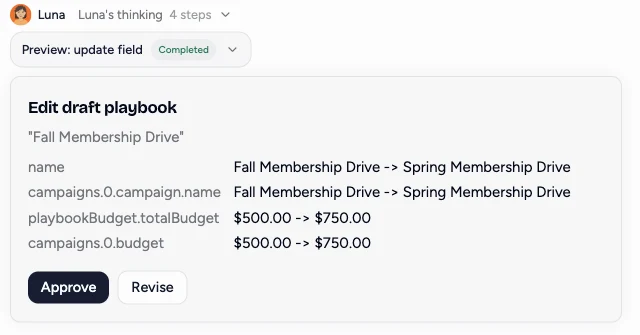
What Luna saves without waiting
Three small, private changes apply in the same turn, right after Luna shows you the preview: saving a private Post Idea with no recurrence, creating an unscheduled post draft, and renaming the chat. None of them publishes anything, spends anything, or is visible to anyone else.
Everything else still stops at the preview and waits for your approval in a later turn, including publishing, scheduling, deleting, spending, sharing, overwriting something that already exists, and every playbook change.
Where Luna works
Luna is the same coworker everywhere you reach her:
- Inside Flamel, from the sidebar and inline in the editors.
- In Slack, so your team can ask her without leaving the channel.
- Across your connected tools, so your listings, reviews, and ads all live in one place she can work from.
- Through MCP, the connection layer that lets Luna work with live Flamel data instead of acting like a generic chatbot. You do not set it up to use Luna inside Flamel; it just works. Teams that want to connect Flamel to their own AI tools can use the Flamel API and MCP server, available to staff and select partners.
Better prompts get better results
- Give Luna the goal.
- Mention the audience.
- Include the platform when it matters.
- Ask for multiple options when you want to compare.
- Paste the draft you already have when you want a rewrite instead of a brand-new answer.