Build an Audience Strategy
Structure audience types and playbooks for evergreen, retargeting, and promotion campaigns without editing Default each time.
For Hub Admins
Hub admins design the audience types and the playbooks that use them. Workspaces fill in their own row of each audience type and opt into playbooks.
An audience strategy is a small set of audience types, each built for one job, plus playbooks that pick the right one for each ad set. Build it once and franchisees launch the right targeting without touching configuration.
How the Pieces Fit
| Piece | What it holds | Who sets it |
|---|---|---|
| Audience type (a tab in Ad Configuration) | One complete targeting package: demographics, custom audiences, saved audience, locations, call to action, and lead form. | The hub creates the type. Each workspace completes its own row. |
| Playbook ad set | Which audience type the ad set uses, plus placements, budget split, and ads. | The hub, when it creates the playbook. |
| Opt-in | Budget, schedule, media, and answers the playbook allows. | The workspace. |
There is no hierarchy between tabs. An ad set uses exactly the audience type it selects, and blank targeting fields on that tab stay blank instead of borrowing from Default. Only the call to action (Website URL, Display URL, Lead Form, Messenger Template) falls back to Default. To change who a campaign reaches, choose or build a different audience type rather than editing Default.
A Starting Structure
Start with two or three types. Each new type adds setup work for every workspace.
| Audience type | Targeting | Use it for |
|---|---|---|
| Default | The location radius or territory, a wide age range, broad interests or a saved audience, and exclusions such as current members. | Evergreen and awareness campaigns. |
| Retargeting | The same geography plus website-visitor and page-engager custom audiences. | Always-on follow-up with people who already know the location. |
| Lookalike | A 1 to 3 percent lookalike of customers or leads. | Reaching new people who resemble your customers. |
A promotion type, such as Membership Retargeting | A copy of Default or Retargeting with the promotion's audiences and landing page. | One campaign push. |
Keep retargeting off Default
A retargeting audience on Default narrows every evergreen campaign to people who already visited. Give retargeting its own audience type so only the ad sets that choose it are narrowed.
Build a Promotion Audience Type
Duplicate Default
Open Social Media Ads, then Configuration, and click Manage Audience Types. Click the Duplicate (copy) icon on the Default row and name the new type by its job, such as Membership Retargeting. Flamel copies each workspace's Default targeting and call to action into the new type. The optional URL suffix, such as ?audience=membership, is added to each workspace's Website URL.
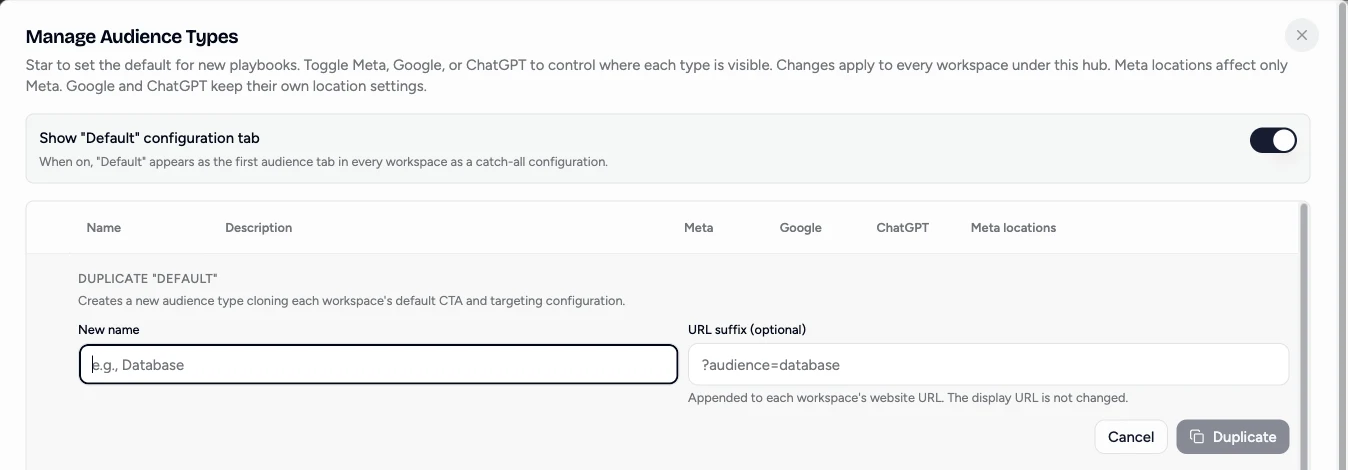
Change only what the promotion needs
Open the new tab and swap in the promotion's audiences, such as membership page visitors, while keeping each location's geography. Check a few workspace rows to confirm each one copied correctly.
Pick it in the playbook
In the playbook's Ad Set step, choose the new audience type. To reach a second audience in the same campaign, add another ad set that uses Lookalike. Every extra ad set needs its own share of the budget, so check the playbook minimum still covers it.
Leave Default alone
Evergreen playbooks keep using Default, so there is nothing to change back when the promotion ends.
Mistakes to Avoid
- Editing Default for each promotion. It changes every future campaign that uses Default, and someone has to remember to change it back.
- Putting retargeting audiences on Default. Every evergreen campaign shrinks to past visitors.
- Creating a type per campaign. Reuse a promotion type across pushes that share the same audiences, and change the landing page with the playbook's destination URL instead.
- Running two locations from one workspace. One workspace has one configuration. Give each service area its own workspace, even when they share an ad account. See Two Locations, One Ad Account.